
Vue SelectDateRange 日期拖动预约组件
SelectDateRange 组件用于进行选择日期时间段预约
1、组件目前实现的功能点如下
- 实现 任意选择日期范围、取消选择、确认选择、
- 实现 默认占用
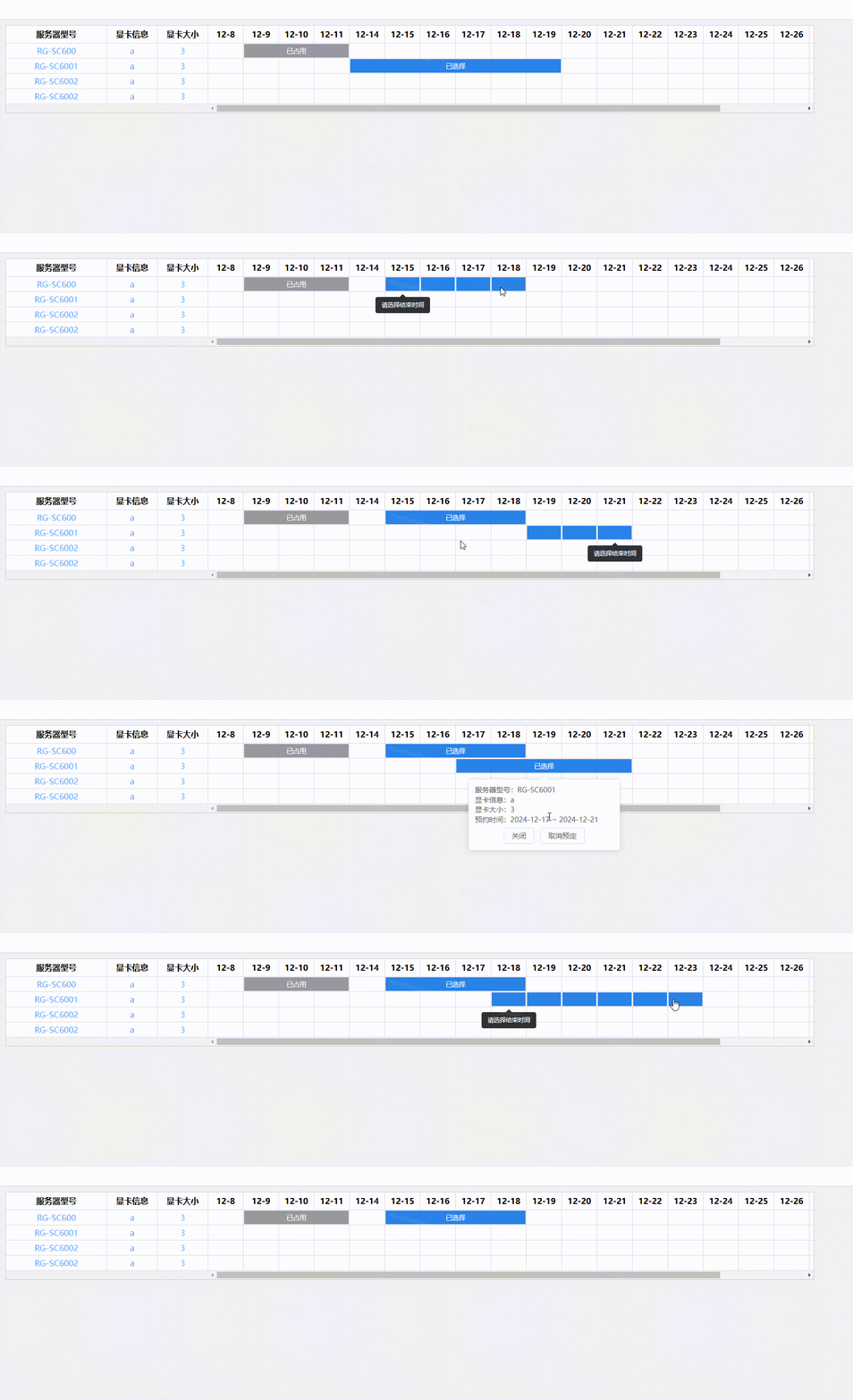
2、在 components 文件中创建 SelectDateRange.vue 文件
<template>
    <div class="select-date-range">
        <!-- 左侧表格 -->
        <div class="left-table">
            <table class="table-wrap">
                <colgroup>
                    <col v-for="item in leftTableColumns" :key="item.key" :style="{ width: (item.width || tdWidth) + 'px' }" />
                </colgroup>
                <thead>
                    <tr>
                        <th v-for="item in leftTableColumns" :key="item.key">{{ item.title }}</th>
                    </tr>
                </thead>
                <tbody>
                    <tr v-for="(row, index) in state.dataSource" :key="index">
                        <td v-for="item in leftTableColumns" :key="item.key" class="title">{{ row[item.key ?? ''] || '' }}</td>
                    </tr>
                </tbody>
            </table>
        </div>

        <!-- 内容 -->
        <div class="right-table">
            <table class="table-wrap">
                <colgroup>
                    <col v-for="title in rightTableColumns" :key="title" :style="{ width: tdWidth + 'px' }" />
                </colgroup>

                <thead>
                    <tr>
                        <th v-for="title in rightTableColumns" :key="title">
                            {{ title.substring(5, title.length) }}
                        </th>
                    </tr>
                </thead>

                <tbody>
                    <tr v-for="(row, index) in state.dataSource" :key="index">
                        <td v-for="(title, i) in rightTableColumns" :key="i">
                            <el-tooltip
                                v-model="state.isShowTip"
                                :disabled="state.activeData.rowId !== row.id || title !== state.activeData.title"
                                effect="dark"
                                trigger="click"
                                content="请选择结束时间"
                                placement="bottom"
                            >
                                <div
                                    class="cell"
                                    :class="[row.dateList.find(v => v.value === title) ? 'active-td' : '']"
                                    @click="handleCellAction(row, index, title, i)"
                                    @mouseenter="onMouseenterInTd(row, index, title, i)"
                                ></div>
                            </el-tooltip>
                            <!-- 禁用数据 -->
                            <template v-for="item in row.disabledDate" :key="item.id">
                                <div v-if="item.list[0] === title" :style="getDisabledTdMask(item)" class="disabled-mask">已占用</div>
                            </template>
                            <!-- 临时数据 -->
                            <template v-for="item in row.middleDateList" :key="item.id">
                                <el-popover
                                    :visible="state.popover.isMiddleShow"
                                    :disabled="state.popover.id !== item.id"
                                    :key="item.id"
                                    v-if="item.list[0].value === title"
                                    placement="bottom"
                                    :width="300"
                                    trigger="click"
                                >
                                    <ul>
                                        <li v-for="item in leftTableColumns" :key="item.key">
                                            <label>{{ item.title }}:</label>
                                            <span>{{ row[item.key ?? ''] }}</span>
                                        </li>
                                        <li>
                                            <label>预约时间:</label>
                                            <span>{{ getChooseDateRange(item) }}</span>
                                        </li>
                                    </ul>
                                    <div class="controls-wrap">
                                        <el-button @click="removeReserve(row)">关闭</el-button>
                                        <el-button type="primary" @click="comfirmReserve(row)">预定 </el-button>
                                    </div>
                                    <template #reference>
                                        <div :style="getChooseTdMask(item)" class="choose-mask">已选择</div>
                                    </template>
                                </el-popover>
                            </template>
                            <!-- 已选择数据 -->
                            <template v-for="item in row.chooseDate" :key="item.id">
                                <el-popover
                                    v-if="item.list[0].value === title"
                                    :visible="state.popover.isCompleteShow"
                                    :disabled="state.popover.id !== item.id"
                                    :key="item.id"
                                    placement="bottom"
                                    :width="300"
                                    trigger="click"
                                >
                                    <ul>
                                        <li v-for="item in leftTableColumns" :key="item.key">
                                            <label>{{ item.title }}:</label>
                                            <span>{{ row[item.key ?? ''] }}</span>
                                        </li>
                                        <li>
                                            <label>预约时间:</label>
                                            <span>{{ getChooseDateRange(item) }}</span>
                                        </li>
                                    </ul>
                                    <div class="controls-wrap">
                                        <el-button @click="closeReservePopover">关闭</el-button>
                                        <el-button type="primary" @click="cancelReserve(row, item)">取消预定 </el-button>
                                    </div>
                                    <template #reference>
                                        <div :style="getChooseTdMask(item)" class="choose-mask" @click="openPopover(item)">已选择</div>
                                    </template>
                                </el-popover>
                            </template>
                        </td>
                    </tr>
                </tbody>
            </table>
        </div>
    </div>
</template>

<script setup lang="ts">
import { ref, reactive, watch, computed, PropType } from 'vue'

// dataSource 数组中每个对象的接口
interface DataSourceItem {
    id: number
    name: string
    mes: string
    num: number
    disabledDate: any[]
    chooseDate: any[]
}

// 列对象的接口
interface Column {
    title: string
    key?: string
    width?: number
    isRange?: boolean
}

interface listItem extends DataSourceItem {
    middleDateList: any[]
    dateList: any[]
}

// state 对象的接口
interface State {
    dataSource: listItem[]
    activeData: { rowId: string; title: string; titleIndex: number; beginIndex: number | string; endIndex: number | string }
    isShowTip: boolean
    popover: { isMiddleShow: boolean; isCompleteShow: boolean; id: string }
}

const emit = defineEmits(['handle-cancel', 'handle-comfirm'])

const props = defineProps({
    // 默认的 table 数据
    dataSource: {
        type: Array as PropType<DataSourceItem[]>,
        default: () => []
    },

    // table 列
    columns: {
        type: Array as PropType<Column[]>,
        default: () => []
    }
})

const leftTableColumns = computed(() => {
    return props.columns.filter(v => !v.isRange)
})

const rightTableColumns = computed(() => {
    return props.columns.filter(v => v.isRange).map(v => v.title)
})

const tdWidth = ref<number>(70)

const state = reactive<State>({
    dataSource: [],
    activeData: { rowId: '', title: '', titleIndex: 0, beginIndex: '', endIndex: '' },
    isShowTip: false,
    popover: {
        // 临时数据
        isMiddleShow: false,
        // 已选择数据
        isCompleteShow: false,
        // 选中的数据 id
        id: ''
    }
})

watch(
    () => props.dataSource,
    newVal => {
        const list = JSON.parse(JSON.stringify(newVal))
        list.forEach(item => {
            item.dateList = []
            item.middleDateList = []
        })
        state.dataSource = list
    },
    { deep: true, immediate: true }
)

function handleCellAction(row, index, title, i) {
    // 开始节点
    if (!state.activeData.rowId) {
        state.activeData.rowId = row.id
        state.activeData.title = title
        state.activeData.titleIndex = i
        state.isShowTip = true

        if (!state.dataSource[index].dateList.find(v => v.value === title)) {
            state.dataSource[index].dateList.push({ value: title, index: i })
            const data = getCurrentDateRange(row, i)
            state.activeData.beginIndex = data.beginIndex
            state.activeData.endIndex = data.endIndex
        }
        console.log(state.activeData)
    } else {
        // 结束节点
        if (state.activeData.rowId === row.id) {
            const parasm = {
                id: String(+new Date()),
                list: state.dataSource[index].dateList
            }
            state.dataSource[index].middleDateList.push(parasm)
            state.dataSource[index].dateList = []

            state.activeData.rowId = ''
            state.activeData.title = ''
            state.activeData.titleIndex = 0
            state.activeData.beginIndex = ''
            state.activeData.endIndex = ''

            state.popover.isMiddleShow = true
            state.popover.id = parasm.id
        }
    }
}

// 获取当前选中开始日期的选择范围
function getCurrentDateRange(row, index) {
    const data = { beginIndex: '', endIndex: '' } as { beginIndex: number | string; endIndex: number | string }

    for (let i = index; i < rightTableColumns.value.length; i++) {
        const a = row.disabledDate.find(v => v.list.includes(rightTableColumns.value[i]))
        const b = row.chooseDate.find(v => v.list.find(k => k.value === rightTableColumns.value[i]))
        if (a || b) {
            data.endIndex = i
            break
        }
    }
    if (data.endIndex === '') data.endIndex = rightTableColumns.value.length - 1

    for (let i = index; i >= 0; i--) {
        const a = row.disabledDate.find(v => v.list.includes(rightTableColumns.value[i]))
        const b = row.chooseDate.find(v => v.list.find(k => k.value === rightTableColumns.value[i]))
        if (a || b) {
            data.beginIndex = i
            break
        }
    }
    if (data.beginIndex === '') data.beginIndex = 0

    return data
}

// table 表格鼠标移入事件
function onMouseenterInTd(row, index, title, i) {
    if (row.id !== state.activeData.rowId) return
    if (state.activeData.beginIndex > i) return
    if (state.activeData.endIndex < i) return

    if (title === state.activeData.title) {
        state.dataSource[index].dateList = [{ value: state.activeData.title, index: i }]
        return
    }

    const list: { value: string; index: number }[] = []
    if (state.activeData.titleIndex < i) {
        rightTableColumns.value.forEach((item, index) => {
            if (state.activeData.titleIndex <= index && index <= i) {
                list.push({ value: item, index })
            }
        })
    } else if (state.activeData.titleIndex > i) {
        rightTableColumns.value.forEach((item, index) => {
            if (state.activeData.titleIndex >= index && index >= i) {
                list.push({ value: item, index })
            }
        })
    }
    state.dataSource[index].dateList = list
}

//  获取已选择日期的遮罩样式
function getDisabledTdMask(data) {
    const beginIndex = rightTableColumns.value.indexOf(data.list[0])
    return {
        width: data.list.length * tdWidth.value - 3 + 'px',
        left: beginIndex * tdWidth.value + 1 + 'px'
    }
}

// 获取已选择日期的遮罩样式
function getChooseTdMask(data) {
    const beginIndex = data.list[0].index
    return {
        width: data.list.length * tdWidth.value - 3 + 'px',
        left: beginIndex * tdWidth.value + 1 + 'px'
    }
}

// 获取已选择日期的日期范围
function getChooseDateRange(data) {
    return `${data.list[0].value} ~ ${data.list[data.list.length - 1].value}`
}

// 打开弹窗
function openPopover(item) {
    if (state.popover.isMiddleShow) return
    if (state.popover.isCompleteShow) closeReservePopover()
    setTimeout(() => {
        state.popover.id = item.id
        state.popover.isCompleteShow = true
    }, 0)
}

function closeReservePopover() {
    state.popover.isCompleteShow = false
    state.popover.isMiddleShow = false
    state.popover.id = ''
}

// 移除预约
function removeReserve(row) {
    closeReservePopover()
    row.middleDateList = []
}

// 取消预约
function cancelReserve(row, item) {
    closeReservePopover()
    row.chooseDate = row.chooseDate.filter(v => v.id !== item.id)
    emit('handle-cancel', formatData(state.dataSource))
}

// 确定预约
function comfirmReserve(row) {
    row.chooseDate.push(row.middleDateList[row.middleDateList.length - 1])
    row.middleDateList = []
    closeReservePopover()
    emit('handle-comfirm', formatData(state.dataSource))
}

function formatData(data) {
    const list = JSON.parse(JSON.stringify(data))
    list.forEach(item => {
        delete item.dateList
        delete item.middleDateList
        item.chooseDate = item.chooseDate.map(v => v.list.map(k => k.value))
    })
    return list
}
</script>

<style lang="scss" scoped>
.select-date-range {
    display: flex;
    border: 1px solid #ccc;
    height: 100%;
    width: 100%;
    position: relative;
    overflow: hidden;
}

.left-table {
    flex: 0 0 300px;

    .title {
        text-align: center;
        color: #5ca8f3;
        white-space: nowrap;
        overflow: hidden;
        text-overflow: ellipsis;
    }
}

.right-table {
    overflow: auto;
}

.active-td {
    background: #2a82e4;
}

.cell {
    width: 100%;
    height: 100%;
    box-sizing: border-box;
}

.disabled-mask {
    position: absolute;
    top: 1px;
    bottom: 2px;
    z-index: 99;
    background: #999;
    text-align: center;
    color: #fff;
    line-height: 28px;
    font-size: 13px;
    cursor: pointer;
}

.choose-mask {
    position: absolute;
    top: 1px;
    bottom: 2px;
    z-index: 99;
    background: #2a82e4;
    text-align: center;
    color: #fff;
    line-height: 28px;
    font-size: 13px;
    cursor: pointer;
}

.table-wrap {
    width: 100%;
    border-collapse: separate;
    border-spacing: 0px;
    table-layout: fixed;

    tr {
        position: relative;
    }

    th {
        height: 35px;
        border-bottom: 1px solid #dcdada;
        border-right: 1px solid #dcdada;
        background: #ebeef5;
        padding: 0;
    }
    td {
        height: 30px;
        border-bottom: 1px solid #dcdada;
        border-right: 1px solid #dcdada;
        background: #fff;
        text-overflow: ellipsis;
        white-space: nowrap;
        overflow: hidden;
        text-align: left;
        padding: 1px;
    }
}

.controls-wrap {
    display: flex;
    justify-content: center;
    padding-top: 6px;
}
</style>
3、在父组件中按下面方式调用
<template>
    <div>
        <selectDateRange :columns="state.columns" :data-source="state.list" @handle-cancel="handleSchedule" @handle-comfirm="handleSchedule" />
    </div>
</template>

<script setup>
import selectDateRange from '@/components/select-date-range/index.vue'

import { reactive } from 'vue'

const state = reactive({
    columns: [
        { title: '服务器型号', key: 'name', width: 200 },
        { title: '显卡信息', key: 'mes', width: 100 },
        { title: '显卡大小', key: 'num', width: 100 },
        { title: '2024-12-8', isRange: true },
        { title: '2024-12-9', isRange: true },
        { title: '2024-12-10', isRange: true },
        { title: '2024-12-11', isRange: true },
        { title: '2024-12-14', isRange: true },
        { title: '2024-12-15', isRange: true },
        { title: '2024-12-16', isRange: true },
        { title: '2024-12-17', isRange: true },
        { title: '2024-12-18', isRange: true },
        { title: '2024-12-19', isRange: true },
        { title: '2024-12-20', isRange: true },
        { title: '2024-12-21', isRange: true },
        { title: '2024-12-22', isRange: true },
        { title: '2024-12-23', isRange: true },
        { title: '2024-12-24', isRange: true },
        { title: '2024-12-25', isRange: true },
        { title: '2024-12-26', isRange: true },
        { title: '2024-12-27', isRange: true },
        { title: '2024-12-28', isRange: true },
        { title: '2024-12-29', isRange: true }
    ],
    list: [
        {
            id: 1,
            name: 'RG-SC600',
            mes: 'a',
            num: 3,
            disabledDate: [{ id: 1, user: '张三', list: ['2024-12-9', '2024-12-10', '2024-12-11'] }],
            chooseDate: []
        },
        {
            id: 2,
            name: 'RG-SC6001',
            mes: 'a',
            num: 3,
            disabledDate: [],
            chooseDate: []
        },
        {
            id: 3,
            name: 'RG-SC6002',
            mes: 'a',
            num: 3,
            disabledDate: [],
            chooseDate: []
        },
        {
            id: 4,
            name: 'RG-SC6002',
            mes: 'a',
            num: 3,
            disabledDate: [],
            chooseDate: []
        }
    ]
})

function handleSchedule(params) {
    console.log({ params })
}
</script>